
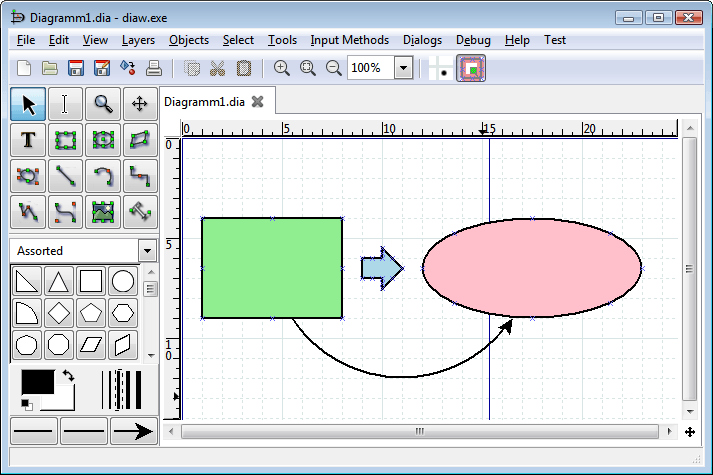
Complete Control Over Your Diagrams
Whether you are mapping out a complex software architecture or designing a simple flowchart, Dia comes pre-loaded with specialized toolsets for every industry.
Software Engineering & UML
Full support for UML Class diagrams, State transitions, and Use Case modeling. Essential for software architects and developers.
- ✓ Class, Object & Collaboration
- ✓ Sequence & Activity Diagrams
Network Topologies
Design detailed network maps using pre-defined Cisco-style icons, switches, routers, and server infrastructure components.
- ✓ Cisco-compatible Icons
- ✓ Logical & Physical Network Layouts
Database & Circuits
Build robust Entity Relationship Diagrams (ERD) or technical logic circuits with specialized engineering libraries.
- ✓ Crow’s Foot & Chen Notation
- ✓ Electrical & Logic Gate Symbols
The Desktop Advantage
Why thousands of engineers are returning to offline-first diagramming.
| Feature | Dia Diagram Editor | Standard SaaS Tools |
|---|---|---|
| Pricing Model | 100% Free Forever | Monthly Subscriptions |
| Data Privacy | Local Storage Only | Cloud-Based (Third Party) |
| Offline Access | Fully Functional Offline | Limited or No Offline |
| System Impact | Ultra Lightweight (<20MB) | High Memory Usage |
| Customizability | XML/SVG Extensions | Restricted to UI Options |
Did you know? Unlike online tools that store your sensitive network architectures on their servers, Dia keeps your .dia files safely on your local machine.
Extensive Shape Repositories
Dia isn’t just a blank canvas. It’s a library of 1000+ specialized objects across 30+ categories.
Custom Shape Support (.shape & SVG)
One of Dia’s most powerful features is its extensibility. Our Dia Diagram Editor package includes a curated collection of legacy and modern shape files. You can also create your own shapes using simple XML and SVG files, making it the most flexible diagramming tool for specialized hardware design and proprietary workflows.
Get Started in Minutes
Mastering Dia is easier than you think. Follow these simple steps to begin.
Install & Launch
Download the optimized installer for your OS and launch the application to see the dual-window interface.
Select Shape Set
Use the drop-down menu in the toolbox to switch between UML, Flowchart, Cisco Networking, or other libraries.
Drag & Connect
Drag objects onto the canvas. Use the Zigzagline or Arc tools to create smart-snapping connections.
Export Final Result
Go to File > Export. Choose SVG for web usage or PDF for professional printing and documentation.
Pro SEO Tip for Users
Did you know? Dia supports Layer Management. For complex architecture diagrams, use layers (Ctrl+L) to organize infrastructure, logical flows, and annotations separately—just like professional CAD software.
Technical Specifications
Detailed compatibility and engine information for power users and IT administrators.
System OS Support
- Windows 11 / 10 / 8.1 (x64 & ARM64)
- macOS Sonoma / Ventura (Intel & Apple Silicon)
- Linux Ubuntu, Debian, Fedora, Arch (GTK+ 3)
- Minimum RAM 512 MB (Ideal for Legacy Systems)
Data & Engine Specs
Dia utilizes a highly efficient internal rendering engine based on **libxml2**, ensuring that even massive network diagrams with thousands of nodes remain responsive and easy to edit.
Master Dia with Our Guides
Step-by-step tutorials and news from the Dia Diagram Editor community.
Common Questions
Everything you need to know about the Dia Diagram Editor.
Q: Is Dia Diagram Editor safe and free from spyware?
Yes, Dia is 100% open-source software under the GPL v2 license. Our distribution site provides clean, verified binaries. Since Dia is an offline-first desktop application, it does not track your data or require a cloud account, making it one of the most secure diagramming tools available.
Q: Does Dia support Windows 11 and the latest macOS?
Absolutely. While the core engine is lightweight and efficient, the latest 0.97.2 version is optimized for Windows 11/12 and macOS (including Apple Silicon M1/M2/M3 chips via Rosetta 2 or native builds). It remains highly compatible with older systems like Windows 7 and 10 as well.
Q: Can I open Microsoft Visio files in Dia?
Dia can import Visio VDX files (the XML-based Visio format). While it may not support every proprietary feature of the newest .vsdx files, it serves as an excellent free alternative for viewing and editing structural Visio layouts without a costly subscription.
Q: How do I add new shapes to Dia?
Adding shapes is simple. You can download .shape and SVG files and place them in your ~/.dia/shapes (Linux/Mac) or %APPDATA%\dia\shapes (Windows) folder. Our “Plus” bundle comes pre-loaded with over 1,000 extra shapes for networking and software engineering.
Have more technical questions?
Visit our Documentation Center →Battle-Tested by the Global Tech Community
Dia Diagram Editor has been a cornerstone of the Linux and Open Source ecosystem for over two decades. Today, it remains the go-to tool for those who value stability over trends.
Compatible with all major environments
Global Compatibility, Local Feel
Design doesn’t have a language barrier, and neither does Dia. Our optimized distribution includes full localized support for over 60 languages. The interface automatically adapts to your system settings, ensuring a seamless experience for international teams.